
Key takeaways
- Match the installed model and revision to the supplier’s documents before choosing the spare item.
- Record the GU10 and Epistar LED catalog entries separately. Ask the supplier to resolve the light-source wording and confirm the servicing method.
- Where a complete fixture is offered, check mechanical fit, electrical compatibility and outdoor installation details before approving the replacement.
Choose the spare item from the documented service method
For an outdoor wall light, identify the installed fixture and ask the supplier which part may be replaced, by whom, and with what instructions. Request a lamp, a manufacturer service part or a complete fixture according to the confirmed method. Record the exact replacement code in the spares schedule.
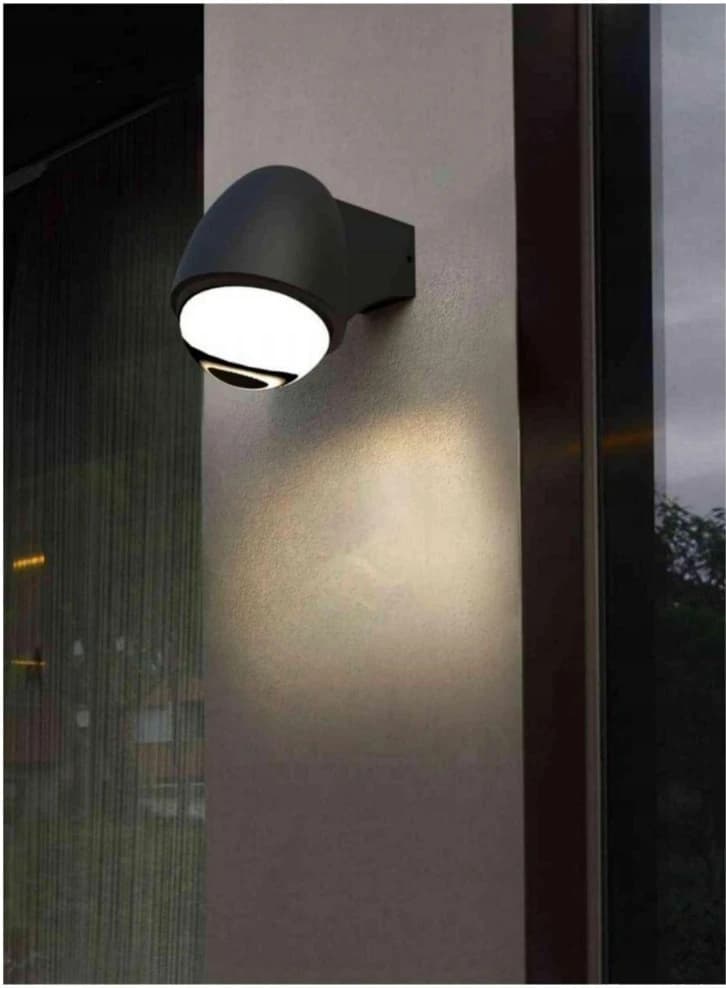
LWA0708A appearance and setting reference from the Lumseq catalog. The image shows the exterior. Confirm the internal light source, servicing arrangements and sealing details from the exact configuration documents.
Two LWA0708A entries with different light-source wording
The Lumseq catalog has two A-model entries. Both list dimensions of 130 × 100 × H140 mm, 5 W, 3000 K and IP65. These are the published values for each entry. Matching values still leave the light-source interface, service parts and installation details to confirm.
The GU10 entry explicitly says its model designation includes “GU10” while the source page heading states Epistar LED. Ask the supplier to confirm the actual lamp interface and what the offered package includes. The Epistar LED entry names the light source and brand. Ask whether a service part is supplied and who can replace it.
| Catalog entry | Light-source field | What the buyer still needs |
|---|---|---|
| LWA0708A-(GU10) | GU10, with a source-heading conflict noted | Actual socket and lamp code, package contents and documented replacement method |
| LWA0708A | Epistar LED | Available service part and part code, revision match, instructions and service responsibility |
Decide what goes on the quotation
Use this decision table for an existing installation. If the only asset record says LWA0708A and you do not know which version is in place, mark that line “configuration to confirm” and ask for an installed label or original order reference. Start the spare-parts review once the supplier can match the installed unit to a current drawing or service document.
For example, a buyer requesting spares for 30 wall lights might have one schedule row for all 30. If labels or order records show two versions, split the asset references by version before requesting spare quantities. Only list a lamp or service part against the version that the supplier confirms it fits.
| Supplier evidence | Quotation line | Approval check |
|---|---|---|
| Lamp interface and lamp change method confirmed for the installed model | Exact lamp code | Confirm the permitted lamp, lead time and the procedure for closing and sealing the fixture after service. |
| Manufacturer confirms an available service part for this revision | Exact service-part code | Confirm who can replace it, which associated pieces are supplied and how the assembly is checked after service. |
| Supplier proposes complete replacement | Exact complete-fixture code | Compare the wall mounting, cable entry, dimensions, electrical requirements and documented outdoor installation. |
| Installed configuration or service method remains unresolved | Request identification and clarification | Keep the spare item open until the supplier matches the installed model and service evidence. |
Close the outdoor maintenance handover
Ask the supplier for the exact offered code, a drawing or service document revision, the supplied parts, any sealing items needed for the approved procedure and the responsible service party. If work involves opening the enclosure, ask how the manufacturer requires seals and closure to be restored and checked. IP65 is the published rating for the listed fixture. Confirm the conditions for the serviced assembly with the manufacturer.
To request a quote, send Lumseq the installed model or order reference, mounting details, the service item you need and the expected spare quantity. If you have several versions on site, attach the location or asset references for each version.
Frequently asked questions
Questions buyers ask
Does the GU10 entry confirm that a lamp is included or can be changed on site?
The entry lists GU10 and reports conflicting source wording. Ask for the exact lamp interface, package contents and authorised service instructions for the offered configuration.
Does the Epistar LED entry determine whether I can order a replacement module?
The entry identifies the light source. Confirm with the supplier whether a service part exists for the installed revision, its code and the approved replacement procedure.
Sources and references
Lumseq LWA0708A-(GU10) configurationLumseq LWA0708A Epistar LED configurationLumseq spare-parts checklistTalk to the product team
Planning an OEM or commercial lighting order?
Send your application, specification and destination market. We will help narrow the product and sample options.
Discuss on WhatsApp